
Friday, August 23, 2013

Wednesday, August 21, 2013
Active Notifications For Samsung Galaxy Fit

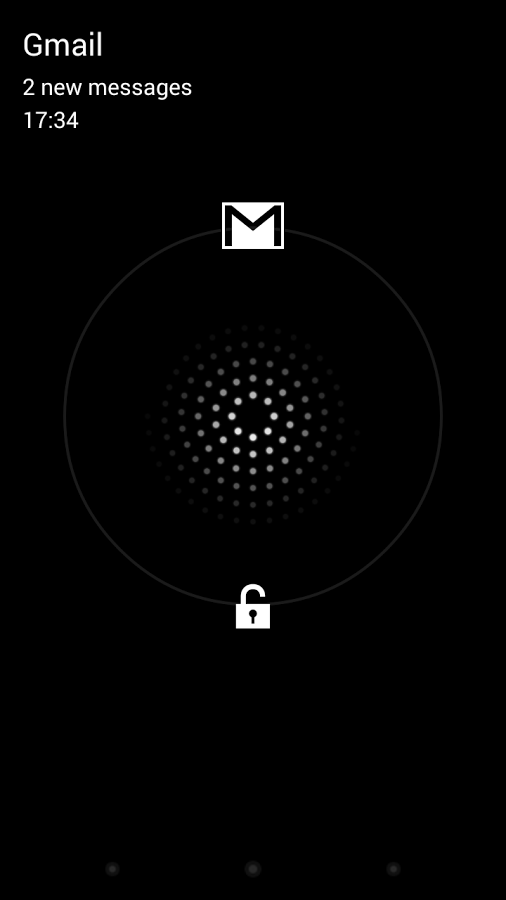

DESCRIPTION
ActiveNotifications allows you to receive important notifications when your screen is off. When you miss a call or receive a new email/SMS, the display will discreetly light up to let you know, without needing to unlock the device. Most phones only have a pulsing notification LED that doesn't actually tell you anything about the incoming notification - with ActiveNotifications, you can immediately decide if something is important enough to act.
Latest Youtube App V5 For Android


FEATURES
- A brand new card-based UI - the app looks better than ever before.
- In-app multitasking. For example, you can make any video you're watching turn into a small window on the bottom right by swiping it down, pressing the down arrow in the top left corner, or simply pressing the Back button.
- You can then navigate the app while the video is playing.
- You bring it back up by dragging or tapping the small window and dismiss it by swiping it sideways.
- The slide-out navigation has been reworked with the latest hamburger-style guidelines in mind.
TWRP Touch Recovery v2.5 For Samsung Galaxy Fit (Stable)


All The Things In This Recovery is Fixed Except Partioning Sd card.This Recovery is working very smooth And Flawless. It is better than CWM recovery As Look Wise And Also By its Performance.There Is nothing any Touch Problem In this Recovery As compared To its Previous Version.
HOW TO INSTALL
- Go to Your CWM Recovery
- Then Choose Install Zip From SD Card
- Then Select TWRP v2.5.zip-> Yes
- Reboot Recovery
- Enjoy
SuperSlim Gapps For JellyBean 4.1.2 And 4.2.2

GOOGLE APPS
- Google Play Store
- Google Services
- Google Calender
- Google Login Services
- Google Backup
- Network Location
- Google Contacts Sync
- Google Setup Wizard
DOWNLOAD(MediaFire)
Tuesday, August 13, 2013
Fully Odex Rom JellyBean 4.2.2 For Samsung Galaxy Fit


FEATURES
Fully Odex Full Rom
System Applications Only need 17 MB Of Internal Memory
HD Games Fully working
Live Wallpaper Working
Fully Customized Rom
And Many More
Please Apply Open Settings->Themes->Apply Whatever u Want
Please Apply Open Settings->Themes->Apply Whatever u Want
All Bugs Fixed
Friday, August 9, 2013


Saturday, August 3, 2013
JellyBean 4.3 For Samsung Galaxy Fit
DESCRIPTION

Android 4.3: An even sweeter Jelly Bean.
Android 4.3’s new restricted profiles feature can be used to limit access to apps and
content, at home with your family and at work. And with support for Bluetooth Smart
accessories, Android is ready for a whole new class of mobile apps.
SCREENSHOTS


Saturday, May 11, 2013
Best Custom Rom For Samsung Galaxy Fit V1
FEATURES
- It is Based On CM7.2 .
- Fully Odexed.
- Maximum Smoothness is Provided as compared to other Roms.
- 160 MB Internal Memory Free In First Boot
- Games Working Smoothly.
- Fully Jellybean Pure Look/Themed
- CPU Overclocked To 864 MHz
- Stock Camera Added For Better Picture Taking And Video Recording at 640*480 Res
- Now Music Player Added
- More Ram Free To Play Games Smoothly . Upto 180MB
- Full Roboto Font
- New CM10 Settings
- Beats Audio Added
Saturday, April 27, 2013


Tuesday, April 16, 2013
Stable TWRP Touch Recovery v2.5.5 For samsung Galaxy Fit


STEPS OF INSTALLATION
Download the TWRP -2.5.5.zip file.
Then copy this file into your sd card without extracting it.
Then enter into Recovery Mod By Pressing Power key+Home Key Simultaneously.
After it Choose install zip from sd card>>>Choose TWRP-2.5.5.zip.
Press Yes.
Reboot System Now.
Enjoy>>>>>>>>>>>>
Sunday, April 14, 2013
Now Playing For Android
DESCRIPTION
Now Playing is a new Holo-themed music player that's fast, looks great, and comes with just the features you actually want in a music player without a ton of the bloat that you don't need.
Now Playing's UI may look simple, but don't let that fool you. The app is fast, auto-imports the music on your phone, and while it doesn't support music in the cloud at Google Music (not their fault: Google hasn't opened the Google Music API to anyone yet), it does come with a lock screen widget, and it persists in the notifications drop-down, so you can control playback without unlocking your phone, or while you use other apps. There's no homescreen widget for the app yet, but looking at the settings page, it's on the way.
Now Playing's UI may look simple, but don't let that fool you. The app is fast, auto-imports the music on your phone, and while it doesn't support music in the cloud at Google Music (not their fault: Google hasn't opened the Google Music API to anyone yet), it does come with a lock screen widget, and it persists in the notifications drop-down, so you can control playback without unlocking your phone, or while you use other apps. There's no homescreen widget for the app yet, but looking at the settings page, it's on the way.
SCREENSHOTS


Saturday, April 13, 2013



Subscribe to:
Posts (Atom)